The Trade Copier widget is where copy groups are built and watched. It pairs copy membership — one leader and its followers, each with a multiplier — with an account console showing balances, P&L, exposure, risk limits, and status, so a failed, unavailable, or locked member is visible before the leader places a trade. It is a singleton: one instance per workspace.
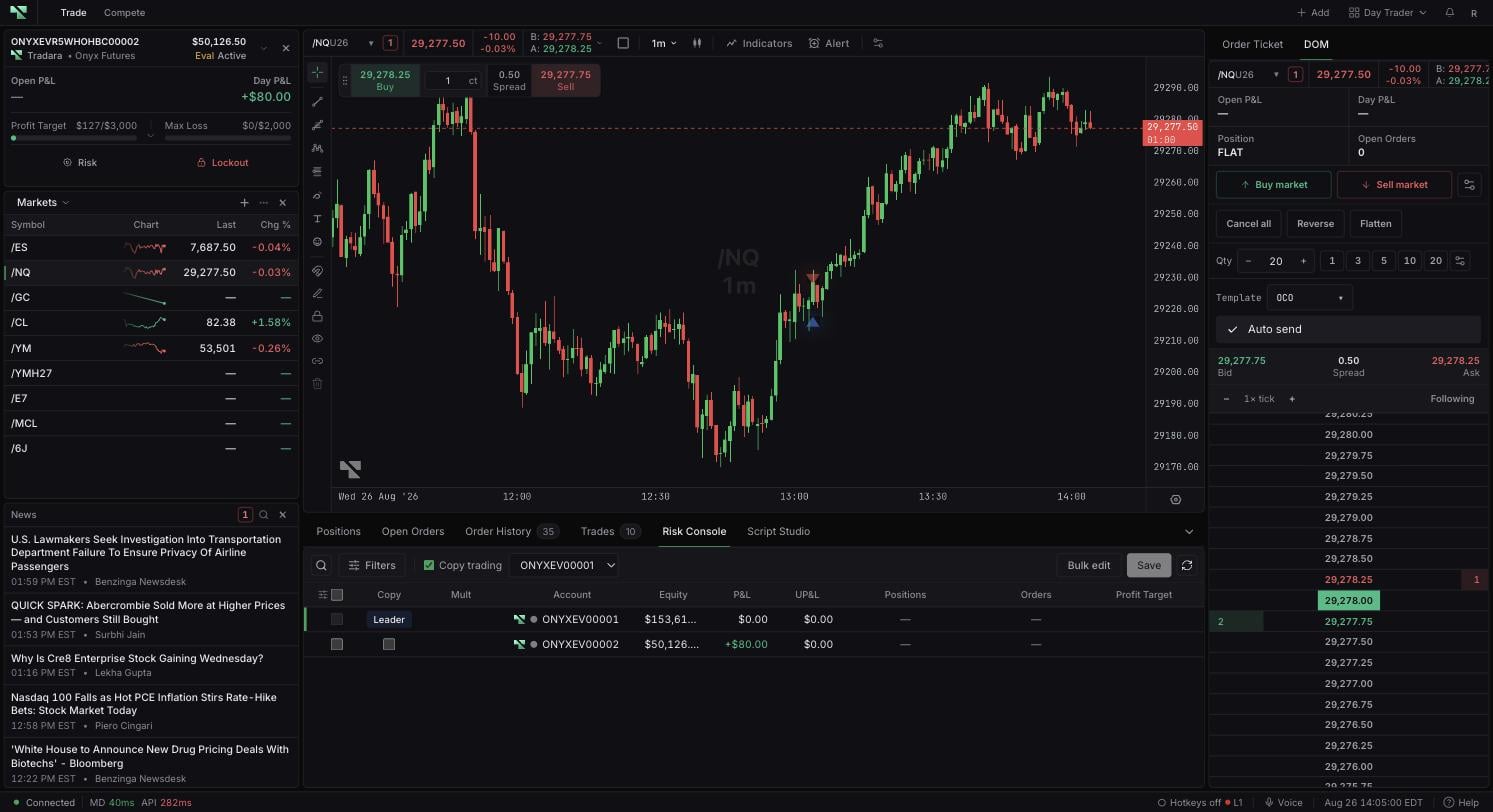
If no group exists yet, Set up copy trading starts one. Otherwise, Choose copy group selects among existing groups, and No copy group returns you to trading a standalone account.
The leader is marked with a crown. Read any Needs attention or lockout banner before leader activity, since a banner names which member is unavailable, locked, or in conflict.
Manage opens group administration:
Select New group, enter a group name, and choose a leader account.
Add eligible follower accounts in Table or Canvas view.
Use Copy trades to arm or disarm the selected group.
Switch or Switch leader changes the leader. If copying is armed, Tradara turns it off during the switch — review the group before arming it again. Check working orders and positions before removing a follower or deleting a group.
Column
What it means
Select
Row selection used by Bulk edit.
Copy
Crown for the leader or checkbox to add or remove a follower from the active group.
Mult
Whole-number follower multiplier. It describes configuration, not a recommended size.
Account
Account name, provider, and status indicator.
Equity
Cash balance plus available live unrealized P&L for an active account.
P&L
Realized day P&L.
UP&L
Live unrealized P&L for open positions.
Balance
Cash balance from the balance feed or initial balance fallback.
Positions
Open position count and exposure details; its menu can close a position.
Orders
Working order count and details; its menu can cancel an order.
Created
Account creation time.
Firm
Firm associated with the account.
Limits on
Whether personal daily-loss or profit-target actions are armed.
Status
Active, locked, failed, or another account state.
Profit Target
Personal profit-target amount configured for the account.
Daily Loss
Personal daily-loss amount configured for the account.
Basis
Daily-loss basis: Static, Realized, or Equity.
Actions
Account risk details and lockout actions.
Sortable headings sort on selection. Configure Trade Copier columns adds, removes, reorders, or restores columns, and dragging a divider resizes them. You can also search by account, filter by provider or status, and select Clear to remove filters. The toolbar shows aggregate group P&L, which is a display total rather than a payout or performance figure.
Profit Target, Daily Loss, and Basis are editable per row; Save risk limits appears once a value changes. Bulk edit applies entered values to Selected accounts, Copy group, or All active. A position or order exposure menu can request Close position or Cancel order for that account, and Actions opens risk settings or an available timed lockout.
Closing positions, cancelling orders, editing limits, or applying a lockout affects the named account, and Bulk edit affects every account in the chosen scope. Confirm the account and whether it is simulated, evaluation, simulated-funded, or live before acting — and review the scope of a bulk change before saving it. Requests to close a position or cancel an order are submitted, not guaranteed to complete. A firm-managed halt cannot be ended from this widget.
A multiplier controls follower quantity scaling. It is not position-size or leverage advice, and each follower still needs independent review.
Copying never overrides account, firm, venue, daily loss, maximum loss, trailing drawdown, or lockout rules, and those protections must not be disabled or worked around. A locked leader places no trades, so nothing copies until the lockout clears; a locked follower receives no copied trades while locked. Failed, unavailable, or conflicting accounts can be blocked from group participation altogether.
Tradara does not guarantee that a follower order keeps the leader's order type, brackets, stop loss, profit targets, price, fill, or slippage. Verify follower orders and positions independently.
Select \+ Add in an editable workspace.
Choose Trade Copier under Account & tools. Its card description is Copy groups & risk limits.
Because the widget is a singleton, locate the existing instance if the catalog does not add another copy.
An instructional video will be added here to illustrate how to properly utilize the Trade Copier widget.
Loading Trade Copier… means account controls are still loading. A red error message means the console failed to load.
No accounts match current filters. means search, provider, status, or enabled-limit filters exclude every row; select Clear.
A Needs attention group names the member problem. Select Fix in Manage, then replace an unavailable leader or remove an unavailable follower.
A locked member stays locked until the stated lockout or firm restriction clears. Do not attempt to bypass the account rule.
