Reduce order-entry steps while retaining visible safety controls.
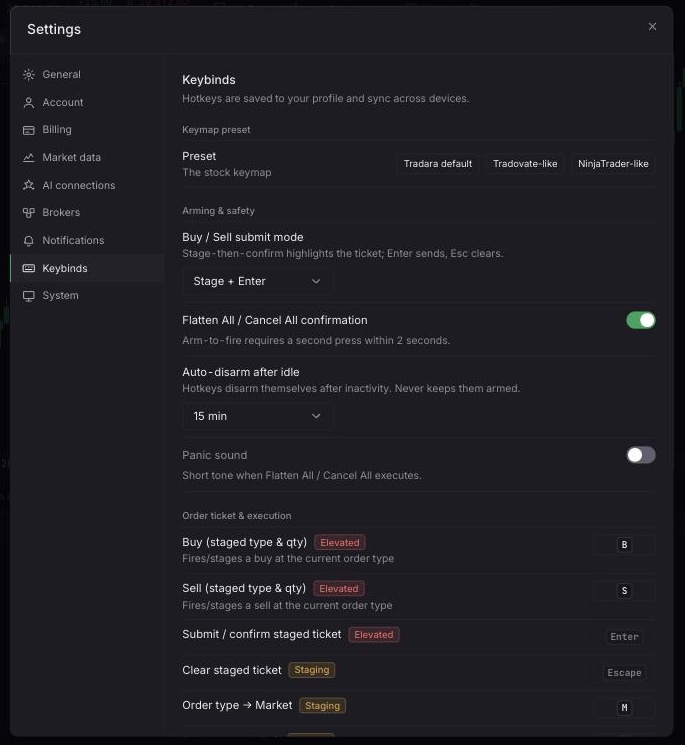
Confirm the trading account, symbol, link group, order type, and quantity. Review Settings > Keybinds before arming execution shortcuts.
An instructional video will be added here to illustrate how to properly utilize quick trading and keyboard shortcuts.
Open Settings > Keybinds.
Review the action and its current key combination.
Select a binding and press the new key combination.
Close Settings, focus the relevant widget, and test the shortcut before relying on it.
Keymap preset switches the whole binding set at once, so a set of hotkeys carried over from another platform still lands where muscle memory expects it. Choosing a preset replaces individual bindings; review the full list afterward rather than assuming every key matched the old layout. Keybinds are saved to your profile and follow you between devices.
Set quantity and select Buy or Sell. With One-click trading off, this prepares the linked ticket. With it on, the click immediately submits a market IOC order.
Keep Stage + Enter while learning, retain confirmation for Flatten All / Cancel All, and configure auto-disarm. `Ctrl+\` arms or disarms trading hotkeys.
Under Arming & safety, a guarded action such as Flatten All or Cancel All requires two presses within a short window rather than firing on the first key; a configurable idle timer disarms hotkeys automatically after a period of inactivity so an armed keyboard is not left live on an unattended tab. An optional distinct alert sound can play whenever a guarded flatten or cancel action actually executes, separate from the fill and stop sounds in Notifications.
Defaults include `M`, `L`, and `T` for order type; `B` and `S` for side; `Enter` to confirm; `Escape` to clear; `C`, `R`, and `E` for close, reverse, and breakeven; and guarded shortcuts for flattening or cancelling. Bindings also cover quantity presets, cycling time in force, and chart-navigation actions such as timeframe stepping and drawing tools; the full list is reviewable and rebindable under Settings > Keybinds.
Stage + Enter visibly stages Confirm Buy or Confirm Sell. One-click or One press submits immediately from the current context.
Quick actions can submit before you catch the wrong account, symbol, side, or quantity. Flatten and reverse can close or reverse positions. Shortcuts depend on focus and context, so avoid bindings that conflict with browser or operating-system shortcuts. Hotkey acceptance is not reversible, and market execution is not price-guaranteed. Simulated trading does not remove evaluation or live risk later.
If nothing happens, arm hotkeys and target the intended widget or link group.
If a shortcut still does not run, click the relevant widget and check for a browser or operating-system conflict.
If submission is unexpectedly immediate, restore Stage + Enter or disable One-click trading.
