Monitor a chart level, capture the visible chart, and reuse chart configuration.
An instructional video will be added here to illustrate how to properly utilize chart alerts, snapshots, and saved settings.
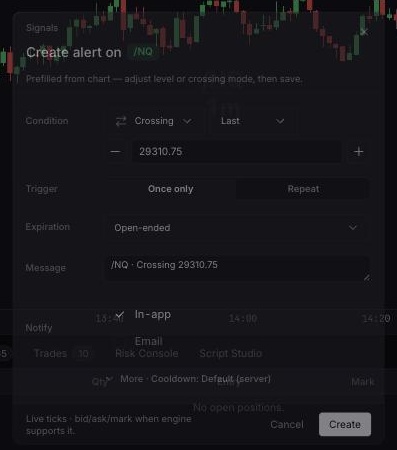
Select Alert, or right-click and choose Add alert on \[symbol\] at \[price\]….
Choose Crossing, Crossing up, or Crossing down and a source: Last, Bid, Ask, or Mark.
Set repetition, expiration, message, and In-app or Email delivery.
For repeating alerts, optionally set a cooldown under More.
Select Create. Review alerts from the terminal header.
Arrange the viewport, select Take a snapshot, then choose Download image, Copy image, Open image in new tab, or Share image.
Under Chart settings > Share > Export, select Copy config, or use Save as… for a template. To restore settings, paste Tradara chart-settings JSON under Import and choose Load into draft, or select a saved template. Preview, then select Apply or OK.
Alerts are not orders or position protection, and delivery can be delayed. Snapshots may contain account, author, symbol, P&L, order, or position information. Portable settings exclude authoritative trading records, and imported settings force one-click trading off.
For alerts, verify the instrument, connection, numeric level, future expiration, and delivery channel.
If clipboard or sharing fails, use Download image.
Confirm imported text is Tradara chart-settings JSON, not a workspace export.
