Attach or manage supported profit-target and stop-loss orders.
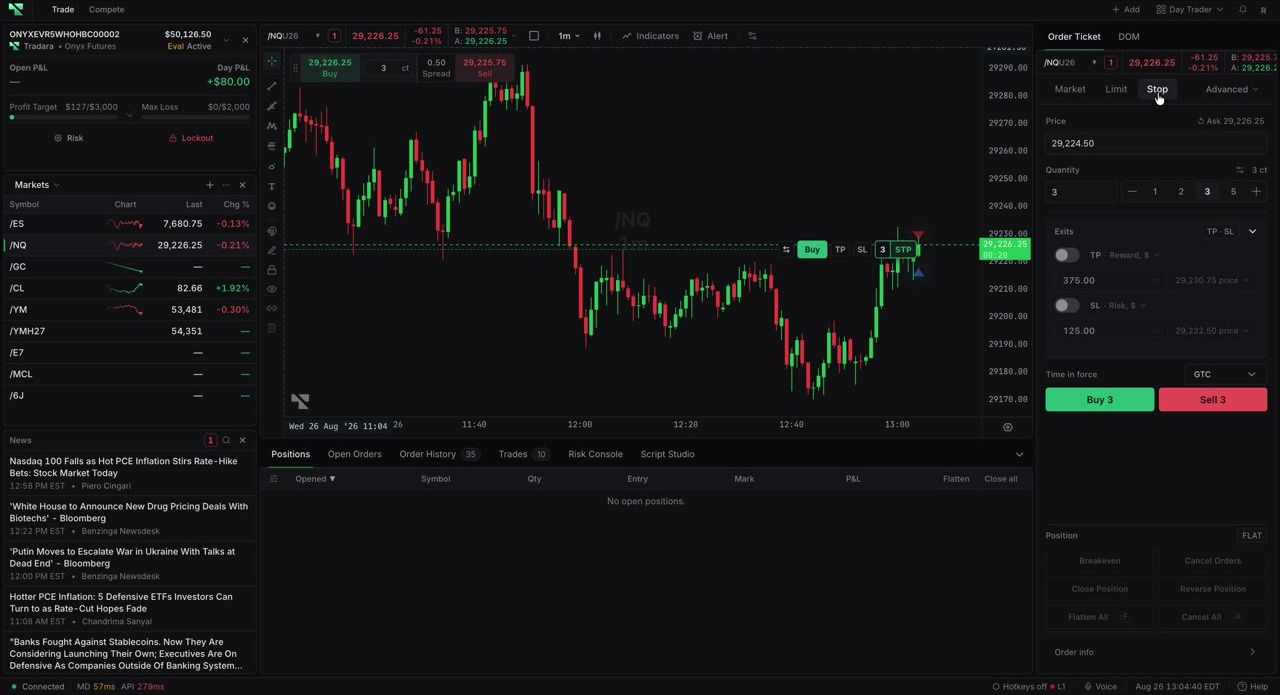
Confirm the account, instrument, position or entry side, and quantity. Wait for instrument metadata to load.
Expand Exits, enable TP, SL, or both, enter positive values, and review the resolved prices before submitting the entry.
One exit creates an OTO group. Both exits create an OTOCO group; after the entry progresses, the target and stop operate as an OCO pair. Existing-position protection can also form an OCO group.
For a matching, non-losing open position, select Breakeven in the ticket's Position area. Tradara moves an existing stop or submits a full-position GTC stop at the average entry. Verify it in Open Orders.
Submitted protection appears as working Target and Stop rows when accepted. Group badges and connectors show supported relationships.
Protection is not guaranteed. Stops can fill away from their triggers, targets may not fill, and linked legs can reject or race with cancellation. Breakeven does not guarantee zero profit or loss. Confirm the selected trading account; simulated trading does not remove evaluation or live risk later.
If a leg is missing, confirm it was enabled and inspect the group in Order History.
If Breakeven is disabled, verify the position exists, has an average entry, and is not shown as losing.
